Short answer
Yes: with an app such as GhostShift, an iPhone can time 0-60 mph (0-100 km/h) with its GPS and motion sensors as an estimate, no extra box needed. Times become comparable with a solid mount, open sky, a dead-stop start and a closed, level course: a 1 % grade alone can shift a 0-60 time by around 0.15 s.
Can an iPhone time 0-60? Yes, as an estimate, under four conditions
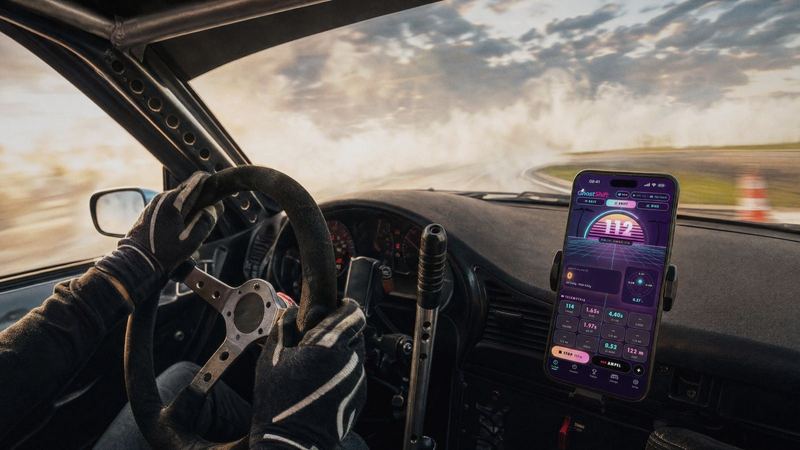
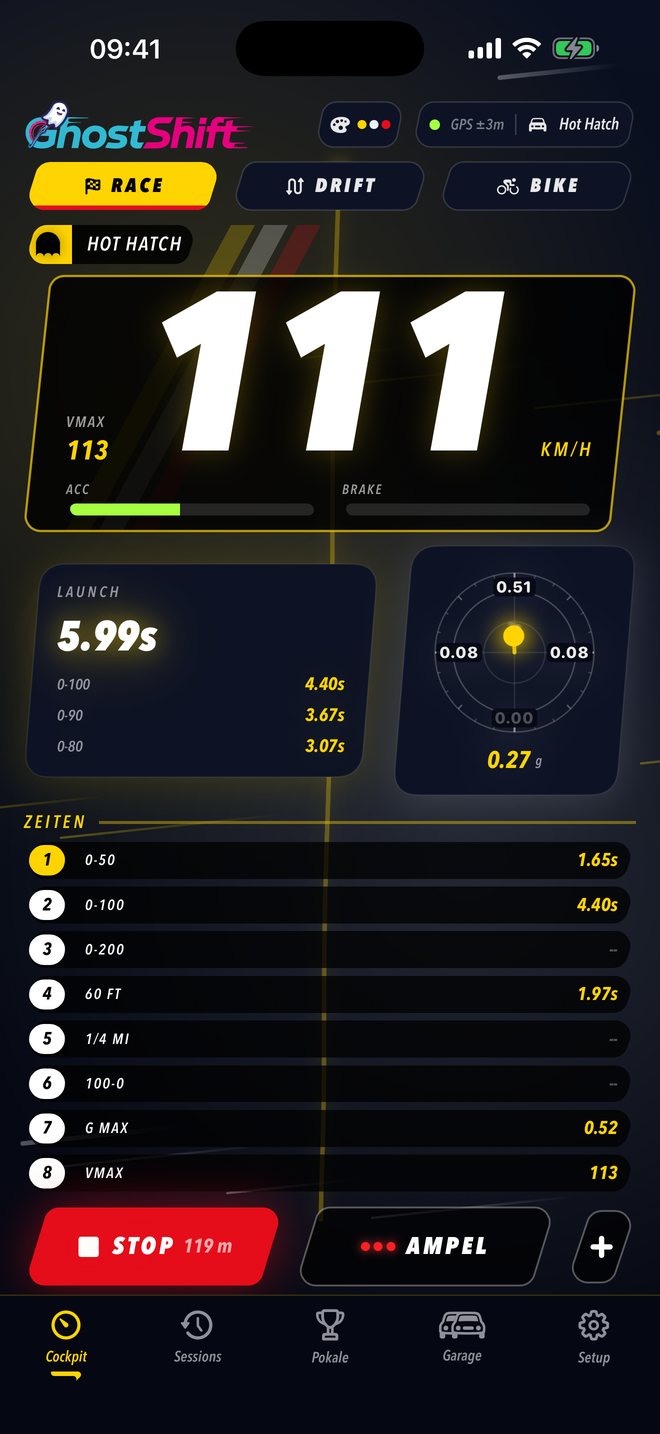
An iPhone can time a 0-60 mph run, but the result is an estimate, not official timing. The hardware is already inside every current model: a satellite receiver for GPS and other systems, an accelerometer, a gyroscope and a barometer. With an app such as GhostShift, the iPhone becomes a 0-60 timer: your time is on screen right after the run, and no add-on box is involved.
Whether the number means anything depends more on the conditions than on the phone. Four things make the difference:
- Open sky. According to GPS.gov, GPS accuracy gets worse near buildings, bridges and trees4.
- A solid mount. A phone that slides around in a cup holder records its own movement along with the car's.
- A level, closed course. A 1 % grade can shift a 0-60 time by around 0.15 seconds (worked example below).
- A start from a dead stop. Only then is it clear where the clock begins.
Stick to those four and you get times that compare well with each other. For most questions that is what matters: did the new tires help, is the car quicker on a cool morning, does a launch with less wheelspin pay off?
How a phone measures speed: the Doppler effect, not dots on a map
Speed does not come from the distance between two positions on a map. It comes from the Doppler effect on the satellite signals. When the receiver moves towards a satellite, that satellite's signal arrives at a slightly higher frequency. A GNSS receiver turns those frequency shifts from at least four satellites into a velocity. Inside GNSS puts the accuracy of this method at a few centimetres per second, against roughly a metre per second when you difference consecutive positions5.
Position itself is far coarser. GPS.gov says GPS-enabled smartphones are typically accurate to within a 4.9 m (16 ft) radius under open sky4. That would be too rough to time a quarter mile from positions alone, but it barely matters for speed. The physics, and what studies say about phone speed measurement, are in Is phone GPS speed accurate?. Which sensors sit in which iPhone is covered in iPhone dual-frequency GPS and sensors.

Key figuresSpeed is far more precise than position
What the sample rate means
The second number that matters is the sample rate: how many new values arrive per second. It decides how tightly you can pin down the moment the car crosses 60 mph. At 60 mph a car covers 26.8 metres (88 feet) every second, which gives this table:
| Sample rate | Time between values | Distance between values at 60 mph |
|---|---|---|
| 1 Hz | 1.00 s | 88 ft (26.8 m) |
| 10 Hz | 0.10 s | 8.8 ft (2.7 m) |
| 20 Hz | 0.05 s | 4.4 ft (1.3 m) |
| 25 Hz | 0.04 s | 3.5 ft (1.1 m) |
| 50 Hz | 0.02 s | 1.8 ft (0.5 m) |
The arithmetic: 60 mph × 0.44704 = 26.82 m/s, divided by the sample rate. The crossing can be interpolated between two values, so the sample rate is not a hard limit on timing resolution. Note too that Apple does not commit to a particular update rate for Core Location, the iOS location interface3. The motion sensors are quicker: Apple says the maximum accelerometer rate depends on the hardware but is usually at least 100 Hz10. So an app's Hz figure does not describe the same thing as a GPS chip's update rate.
What you need: an iPhone on iOS 17, a mount and a course you're allowed to use
Clean runs take three things, and none of them is a timing box.
- An iPhone on iOS 17 or later. Apple lists iOS 17 support from the iPhone XR and XS onwards, plus the second- and third-generation iPhone SE7. Newer Pro models have a dual-frequency receiver, older ones a single-frequency one. What that changes is explained in iPhone sensors.
- A solid mount. The phone has to be locked to the car with no play and no wobble. Suction cup, vent clip or clamp: choosing a phone mount for timing goes through the options. On a motorcycle, Apple advises against mounting an iPhone on high-power or high-volume engines and recommends a vibration-dampening mount on mopeds and scooters, because strong vibration can degrade the camera's stabilisation and autofocus11.
- A closed course with permission. An airfield, drag strip, race track or kart track, always with the operator's approval. Public roads are off limits for acceleration and braking runs. Your first track day and lap times at the kart track show how to find a slot.
A clean run in twelve steps
A clean run is above all a repeatable run. This sequence removes the biggest sources of error before you even launch:
- Sort out the venue. Get the operator's permission, agree on the timed section and the run-off, read the event rules.
- Check the strip. Pick a straight, level section with open sky, away from hangars, bridges and tall trees4.
- Prepare the car. Check tire pressures, note fuel level and load. Comparing two runs only works from the same starting point.
- Mount the iPhone solidly. You should be able to see the display without touching it while driving. Think about heat if the sun is out and the cable is plugged in (more below).
- Lock in your settings. Choose units (mph or km/h), sample rate and one-foot rollout before the first run, then leave them alone.
- Wait for reception. Start the app with the car out in the open and wait until the GPS badge in the cockpit turns green.
- Come to a complete stop. The car has to be stationary until GhostShift shows READY.
- Launch and leave the phone alone. There is nothing to tap in GhostShift while you drive. Both hands stay on the wheel.
- Slow down safely. Brake in the run-off area you agreed with the operator.
- Check the result. Did the run get the "verified" stamp? Keep runs without it out of your comparison.
- Do several runs in both directions. Averaging out-and-back runs partly cancels a slight slope and wind. Let brakes and drivetrain cool between runs.
- Write down the conditions. Temperature, wind, tires and time of day. Without notes you'll never explain a two-tenths difference later.
Every discipline at a glance: from 0-60 to the quarter mile
0-60 mph is only one of several measurements. The drag distances come from American motorsport and are defined in feet and miles. Using NIST's conversion factors (1 ft = 0.3048 m, 1 mile = 1,609.344 m exactly)9, they work out like this:
| Discipline | What it measures | Read more |
|---|---|---|
| 0-60 mph | Time from a standstill to 60 mph (96.56 km/h), the US benchmark | Rollout explained |
| 0-100 km/h | The European benchmark, always a little longer than 0-60 mph because 100 km/h is 62.1 mph | Brochure vs. your own run |
| 60-130 mph, 100-200 km/h | Rolling intervals with no launch, showing performance at higher speeds | Rolling intervals |
| 60 feet | Time for the first 18.29 m, a measure of launch quality | 60-foot times |
| 1/8 mile | Time and trap speed after 660 ft (201.17 m) | Drag distances |
| 1/4 mile | Time and trap speed after 1,320 ft (402.34 m), the classic drag-strip distance | Drag distances |
| Braking 100-0 and 50-0 km/h | Stopping distance and time to a standstill | Braking from 100 km/h |
The metric lengths are simple conversions: 60 × 0.3048 m = 18.288 m; 1,609.344 m ÷ 8 = 201.168 m; 1,609.344 m ÷ 4 = 402.336 m; and 100 km/h ÷ 1.609344 = 62.14 mph. In GhostShift the acceleration range runs from 0-10 to 0-300 km/h, and in mph mode you get 0-60 and 0-100 mph. Under braking, the app shows distance and time for 100-0 and 50-0 km/h.
Reading the result: the "verified" stamp and rollout
A time is only worth as much as the conditions it was set in. That is why GhostShift shows two extra pieces of information next to every run.
The "verified" stamp
The stamp shows at a glance whether the measuring conditions were right for a fair comparison. It never changes the measured value; it only tells you how to weigh it. A run without the stamp isn't wrong, it was just set in poorer conditions.
With or without one-foot rollout
With one-foot rollout the clock starts only after the car has moved 30.48 centimetres. The practice comes from drag racing and, according to auto motor und sport, can improve sprint times by up to 0.3 seconds2. MotorTrend timed the Porsche Taycan Turbo GT with the Weissach package at 1.89 seconds to 60 mph with rollout and 2.10 seconds without1. The German magazine gives another example: BMW quotes 3.8 seconds to 100 km/h for the iX M70 xDrive, or 3.5 seconds with rollout2.
Key figuresWith or without rollout: two times for the same sprint
In GhostShift you switch rollout on or off in Setup. What matters is that every run you compare uses the same setting, which is why it is shown next to each result. More in One-foot rollout explained.
Why your time differs from the brochure
Factory figures are not measured to a standard. auto motor und sport points out that no rule fixes the conditions for a 0-100 km/h sprint: fuel load, driver weight, temperature, tires and grip are all left open2. On top of that, some figures include rollout and some don't. Your own run can come out quicker or slower without either the car or the phone doing anything wrong. The full comparison is in Why your 0-60 time almost never matches the brochure.
Worked example: what a 1 % grade does
A slight slope is hard to see but easy to measure. A simplified model with constant acceleration shows the size of the effect:
- A car runs 0-60 mph in 6.5 s. Average acceleration: 26.82 m/s ÷ 6.5 s = 4.13 m/s².
- On a 1 % grade, gravity pulls back with about 1 % of its value: 0.01 × 9.8 m/s² = 0.098 m/s²10.
- With the same drive force, acceleration drops to 4.03 m/s². The time rises to 26.82 ÷ 4.03 = 6.66 s, about 0.16 s slower.
- Downhill it works the other way: about 0.15 s quicker.
ChartEach 1 % of slope shifts the time to 60 mph by more than a tenth
Values as a table
| Slope in % (negative = downhill) | Example car, 6.5 s on level ground |
|---|---|
| -2.0 | 6.21 s |
| -1.5 | 6.28 s |
| -1.0 | 6.35 s |
| -0.5 | 6.42 s |
| 0.0 | 6.50 s |
| 0.5 | 6.58 s |
| 1.0 | 6.66 s |
| 1.5 | 6.74 s |
| 2.0 | 6.82 s |
So on one and the same strip, an uphill and a downhill run can be some 0.3 s apart. That is why it pays to pick a strip that is as level as possible and to run both directions. Real cars don't accelerate evenly, but the order of magnitude holds. Wind acts in a similar way, especially at higher speeds: see slope and wind. How warm, thin air saps engine power is covered in air density and weather.
Limits: what an iPhone can't do
An iPhone is not a calibrated instrument, and GhostShift is not calibrated or certified. Every time is an estimate from the phone's sensor data. These are the main limits:
- No official timing. Results, records and competition times come from the venue's timing beams, not from a phone.
- Dependence on reception. Quality varies with sky view, satellite geometry and device. A 2025 study from alpine skiing compared four smartphones with a reference system and found an average speed error below 1.9 km/h (about 1.2 mph), with the phones logging at 1 Hz6. That doesn't transfer directly to a car, but it shows the order of magnitude.
- No guaranteed GPS rate. Apple does not commit to a fixed Core Location update rate3, so an app can only be as good as the data the system delivers.
- Heat. Apple designs the iPhone for ambient temperatures between 0 and 35 °C (32 to 95 °F). When it gets too hot it may slow charging, dim the display and drop its cellular radios into a low-power state8. Behind a windscreen in the sun that happens quickly. The "Relaxed" sample rate keeps the phone cooler.
- The mount. Anything that moves between car and phone ends up in the motion data.
For "is my car quicker today than last week?" these limits are manageable as long as conditions stay the same. For "how quick is my car to the hundredth?" a phone is the wrong tool.
Further reading by topic: 20 guides on timing, drag, braking and the track
This overview links every in-depth guide. Each one answers a single question, with sources and worked numbers.
Measuring
- Is phone GPS speed accurate?: the Doppler effect, sample rates and studies on phone speed.
- iPhone dual-frequency GPS and sensors: GPS, accelerometer, gyroscope and barometer by model.
- Slope and wind: how far each one shifts your time.
- Air density and weather: why cool, dry air brings quicker times.
Drag and acceleration
- One-foot rollout explained: 30 centimetres, up to 0.3 seconds.
- Brochure figure vs. your own run: why the numbers rarely match.
- Power-to-weight ratio: what power per unit of weight says about acceleration.
- EV acceleration: torque from a standstill and what it means for timing.
- The 60-foot time: what your launch says about your quarter mile.
- Reaction time at the tree: why pro-level lights aren't pure reaction.
- Eighth and quarter mile: distances, trap speeds and context.
- Rolling intervals: 60-130 mph and 100-200 km/h.
Braking and g-forces
- Braking from 100 km/h: driving-school maths vs. tire tests.
- G-forces compared: from a daily driver to Formula 1.
- Motorcycle lean angle: what MotoGP angles tell you about cornering physics.
Track and laps
- Your first track day with lap timing: a checklist from mount to analysis.
- Lap times at the kart track: what's different in a kart.
- Reading sector times: where on the lap the time is hiding.
Hardware and accessories
- OBD2 on the iPhone: which adapters work and what data you get.
- The right mount: why it decides the quality of your data.
The app's own features are on the Measure, Track, Start lights and OBD2 pages.
FAQ
Do I need an extra GPS box to time 0-60?
No. GhostShift uses the iPhone's own GPS and motion sensors. What you do need is a solid mount and a closed course with the operator's permission.
How accurate is a 0-60 time from a phone?
It is an estimate, not a calibrated instrument, and GhostShift is not calibrated or certified. Speed comes from the Doppler effect on the satellite signals and is far more precise than position, which GPS.gov puts at typically 4.9 m (16 ft) under open sky. What counts most is comparing your own runs under the same conditions.
Can I time a motorcycle?
Yes, anything that takes a solid mount works, and two-wheelers get bike mode with lean angle. Apple advises against mounting an iPhone directly on high-power motorcycles and recommends a vibration-dampening mount on smaller bikes to protect the camera.
Where does my run data go?
It stays on your iPhone. GhostShift needs no account and no server, and a backup file moves everything to a new phone.
Why is my time slower than the manufacturer's figure?
There is no standard for factory figures: fuel load, driver weight, temperature, tires and grip are not fixed, and some figures include a one-foot rollout. Slope and wind add to that, so compare runs made under the same conditions.
Sources
- Porsche Taycan Turbo GT sets 1.89-second 0-60 mph time (MotorTrend test) – Carscoops, 1 April 2025
- 1-Foot-Rollout: Messmethode für den 0-100-km/h-Sprint – auto motor und sport (Uli Baumann), 29 January 2025
- Core Location update rate: reply by an Apple engineer – Apple Developer Forums, thread 722855, 2023
- GPS Accuracy – GPS.gov (U.S. government)
- How does a GNSS receiver estimate velocity? – Inside GNSS, 14 March 2015
- Petrella, Ellenberger, Gilgien: Accuracy evaluation of smartphone-based GNSS position and speed tracking for ski-slope and safety management – PLoS One 20(8), 2025
- iPhone models compatible with iOS 17 – Apple Support
- If your iPhone or iPad gets too hot or too cold – Apple Support
- U.S. Survey Foot: Revised Unit Conversion Factors – NIST, updated 3 February 2026
- Getting raw accelerometer events – Apple Developer Documentation
- Exposure to vibrations, like those generated by high-powered motorcycle engines, might impact iPhone cameras – Apple Support
GhostShift is not a calibrated or certified instrument: every value is an estimate from your iPhone's sensors. Only do timed runs on a closed course with the operator's permission.